
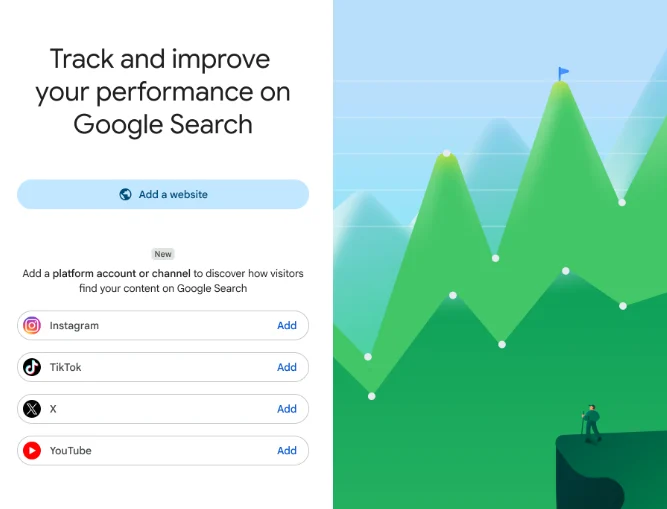
If you work in SEO, you probably think of Search Console as a website-only tool. That’s changed. Google just rolled out Google Search Console platform properties, and for the first time, the tool can show you how your Instagram, X, YouTube, and TikTok content performs in Google Search and Discover — no website required.
It’s a bigger deal than it sounds. Here’s what’s actually going on, and how to start using it.
Not sure if this feature has landed on your account yet? We’ll check for you — free.
What Are Google Search Console Platform Properties, Really?
Think of a GSC platform property as a new “site” you can add to Search Console — except instead of a domain, it’s a social account. Instead of proving ownership through DNS or an HTML file (the old way), you connect your account through a secure authorization flow, similar to logging into any third-party app.
Once it’s connected, that account starts pulling in the same kind of data Search Console has reported on websites for years — clicks, impressions, and the actual queries people used to find your content. This is what people mean when they talk about Google Search Console social media tracking: it’s not analytics from the platform itself, it’s analytics on how Google Search sends people to that platform. It’s a natural extension of good social media optimization — you’re no longer guessing whether your social content helps your search visibility.
Which Platforms Can You Track?
The rollout covers Google Search Console Instagram X YouTube tracking, plus TikTok. So four platforms in total at launch:
- Instagram — posts and Stories that surface in Search
- X — individual post visibility in results
- YouTube — videos appearing in Search and Discover
- TikTok — the newest addition, and arguably the most requested one
Google hasn’t said whether more platforms are coming, but given how fast this space moves, it wouldn’t be surprising.
If your social media marketing is already firing on all four platforms, this is basically free bonus reporting — you just have to switch it on.
How Do I Add Social Media to Google Search Console?
Setup follows the same logic as adding any property:
- Go to the property selector inside Search Console
- Click Add Property
- Choose your platform (Instagram, X, YouTube, or TikTok)
- Authorize the connection when prompted
That’s it — no code, no file uploads. One catch: the rollout is happening gradually, so if you don’t see the option yet, it’s likely just a matter of time.
This feature is rolling out now. Early movers win the ranking race — don’t wait to check.
What Shows Up in the GSC Social Media Report
Once you’re connected, there are three sections worth knowing:
Performance report — your bread and butter. Clicks, impressions, CTR, and average position, broken down by post or query.
Insights report — a faster, more digestible view of what’s trending: top posts, discovery patterns, where your traffic is coming from.
Achievements — milestone tracking over a rolling 28-day window, basically a nudge when you hit a new growth threshold.
If you’ve used Search Console for a website before, none of this will feel unfamiliar. It’s the same reporting logic, just pointed at a different kind of property.
Why This Actually Matters
Here’s the real shift: Google is no longer treating your brand as “a website.” It’s treating you as an entity that shows up across platforms, and it’s building tools to match that reality. It’s the same underlying shift that’s driving Generative Engine Optimization — search is expanding well beyond the traditional blue-link results page, and platform properties are Google’s way of catching up. If you’ve read our piece on building topical authority for AI search, this will sound familiar: the platforms where your content lives now matter as much as the content itself.
For creators, this closes a real blind spot. Instagram and TikTok will tell you how a post performed in-app, but they’ve never told you whether that same post is quietly pulling traffic from Google Search weeks later. Now you can actually see that.
For brands running influencer campaigns, this is arguably even more useful. You can finally check whether a collaboration is generating search visibility that outlasts the campaign itself — not just likes and shares in the first 48 hours.
One caveat worth repeating: this data is Google-side only. It won’t replace your native platform analytics, and it isn’t meant to. Use it alongside your existing dashboards, not instead of them — the same way we recommend pairing zero-click search strategy with traditional ranking metrics rather than picking one over the other.
Conclusion
Platform properties are one of the more significant changes to Search Console in recent memory — not because the reports themselves are complicated, but because of what they represent. Search is no longer confined to websites, and Google’s tooling is finally catching up to that reality. If you publish on Instagram, X, YouTube, or TikTok, it’s worth checking your Search Console account soon, since access is still expanding. Pair this new data with your existing content and SEO strategy, and you’ll get a much clearer picture of where people are actually finding you.
FAQs
How do I add social media to Google Search Console?
Go to the property selector, click “Add Property,” choose your platform (Instagram, X, YouTube, or TikTok), and authorize the connection when prompted.
What are Google’s social media platforms in Search Console?
At launch, Search Console supports Instagram, X, YouTube, and TikTok as platform properties.
Do I need a website to use platform properties?
No. Platform properties were built specifically for creators and brands without an owned website.
Is this feature live for everyone right now?
ot yet. Google is rolling it out gradually over the coming weeks, so availability varies by account.
Does this replace native analytics like Instagram Insights or TikTok Analytics?
No. It only shows performance in Google Search and Discover, not in-app engagement.
How is a platform property different from a Google Search profile?
A Search profile is a public-facing page. A platform property is a private analytics dashboard — it doesn’t show your content to anyone, it just reports on how it performs.